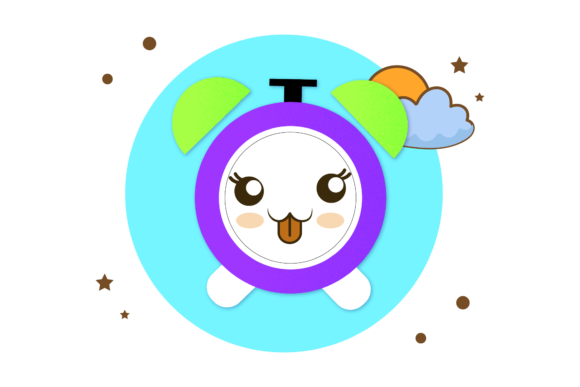
Kawaii Alarm Clock Bubble Design for Back to School
Getting ready for a new school year often comes with a mix of excitement and a need for fresh, cheerful tools. The Back to School Kawaii Alarm Clock Bubble design offers a delightful way to bring personality and warmth to your projects, whether you are a teacher preparing classroom materials, a parent helping a child organize their space, or a small business owner creating products for the season. This charming illustration captures the spirit of early mornings, gentle reminders, and the playful aesthetic that appeals to kids and adults alike.
What Makes This Design Special
At its heart, this design combines a classic school symbol—the alarm clock—with a kawaii style. Kawaii, a Japanese concept centered on cuteness, transforms everyday objects into friendly, approachable characters. Here, the clock feels more like a cheerful companion than a strict timekeeper. Soft lines, round shapes, and a bubbly, whimsical look make it easy to connect with. The design sits on a generous 1920px by 1280px canvas, giving you plenty of space for crisp, clear printing or digital use.
You receive six file formats in total: one AI file, one EPS file, one SVG file, one DXF file, one JPG file, and one PNG file. This variety means you can work in almost any environment, from professional design software like Adobe Illustrator to simple home applications. The vector formats (AI, EPS, SVG, DXF) allow you to scale the design without losing quality, while the JPG and PNG files offer immediate, ready-to-use options.
Who Would Enjoy This Design
This piece is not just for one type of user. Its appeal spreads across several groups, each finding value in a different way.
Teachers and Educators
If you teach young children, you know how important a welcoming classroom environment can be. Adding a kawaii alarm clock to your bulletin boards, daily schedules, or reward charts brings a touch of fun to routines. It helps children feel more at ease with topics like telling time or morning procedures. The file formats make it simple to print on cardstock, laminate, and reuse year after year.
Parents and Caregivers
Preparing a child for a new grade often involves decorating binders, notebooks, or even a bedroom wall. This design fits naturally into those projects. You could use the PNG file to create custom stickers for a lunchbox or use the SVG to cut iron-on vinyl for a t-shirt. The gentle, friendly look reduces any anxiety about the school day starting, making mornings feel a little more playful.
Small Business Owners and Creators
If you sell educational printables, party decorations, or digital scrapbook elements on platforms like Etsy or Teachers Pay Teachers, this design can become a versatile asset. The commercial-friendly file types let you adapt the artwork for planners, sticker sheets, or classroom decor packs. The DXF format even opens up possibilities for cutting machines, so you can produce physical products like vinyl decals or paper cutouts.
Hobbyists and Freelancers
Even if you just enjoy crafting for yourself, this design offers a quick way to start a project without needing to draw from scratch. You can recolor elements in Adobe Illustrator, add your own text, or combine the clock with other illustrations. The easy-to-edit nature of the AI and EPS files means you are not stuck with a fixed image—you can tailor it to match your exact color scheme or theme.
Practical Uses for the Design
The real strength of this set lies in how many ways you can apply it. Let us walk through some realistic scenarios to spark ideas.
Classroom Printables and Decor
A teacher might print the JPG version on letter-sized paper and cut out the alarm clock for a "Time to Learn" display. Pair it with a simple arrow to show different daily activities. The large canvas size ensures the image remains clear even when scaled down to smaller cards or labels. For a more permanent solution, use the SVG file to create a die-cut shape with a cutting machine and attach it to the wall.
Digital Planners and Organizers
Many people use digital planning apps on tablets or laptops. The PNG file with a transparent background (if you export it that way) or the SVG format can be inserted as a decorative element in GoodNotes, Notability, or similar apps. Place the kawaii clock near your morning routine checklist or homework tracker to add a visual cue that feels encouraging rather than demanding.
Custom Stickers and Labels
Stickers remain a favorite for personalizing school supplies. With the DXF file, you can cut sticker sheets on a cutting machine and sell them or give them as gifts. The EPS file also works well for screen printing if you want to create fabric labels for backpacks or pencil cases. The bubble detail around the clock adds a soft, friendly border that looks lovely on round stickers.
Marketing Material for Small Shops
If you run an online shop, using this design in your social media graphics or product previews can attract customers looking for cute back-to-school items. The large canvas means you can crop into different sections for thumbnails or banners without losing detail. The vector formats also let you adjust colors to match your brand palette, giving you a cohesive look across your store.
What to Consider Before Using the Files
Even with a set as complete as this, a few points can help you get the best results.
Software Compatibility
The AI and EPS files work best with Adobe Illustrator or other vector editing programs. If you do not have access to those, the SVG and DXF formats are more widely supported in free tools like Inkscape, Gravit Designer, or online converters. The JPG and PNG files open in any image viewer, so you can start using them immediately without specialized software.
Editing and Customization
While the design is easy to edit, you will need at least a basic understanding of your chosen software to change colors, resize elements, or combine it with other graphics. If you are a beginner, start by importing the SVG into a free editor and experiment with simple adjustments. The layers in the AI file are usually well-organized, making it straightforward to isolate the clock, bubble, or background elements.
Printing and Physical Output
For printed projects, remember that the canvas size of 1920x1280 pixels gives you a resolution of about 160 PPI at full size. This is fine for most desktop printing and small signs, but for large posters or high-end print jobs, you might want to upscale the vector files. The AI and EPS formats scale infinitely, so you can output at any size without quality loss. Test a small sample first if you are printing on fabric or specialty paper.
File Storage and Organization
You receive six separate files, so keeping them organized saves time later. Create a dedicated folder on your computer or cloud drive, and name the files clearly. If you plan to use only one format most of the time, archive the others for future projects. Having the DXF handy is especially useful if you buy a cutting machine later, even if you do not need it right now.
The Appeal of Cute Design in Serious Work
Some people might wonder if a "cute" design can still be professional. In reality, adding a friendly, kawaii element to educational or business materials often increases engagement, especially with younger audiences or creative communities. It signals that your content is approachable and thoughtfully made. The Back to School Kawaii Alarm Clock Bubble sits in a sweet spot where it feels warm without being childish, and playful without being distracting.
For freelancers and entrepreneurs, this design can differentiate your shop from others that rely on generic stock art. It gives your products a distinctive personality that customers remember. For educators, it makes your classroom feel like a welcoming space where learning feels less like a chore.
Getting Started with Your New Files
Once you download the six files, you can jump right into your project. If you feel unsure about which format to use, here is a simple rule of thumb: use the JPG or PNG when you need a quick print or digital insert, and use the AI, EPS, SVG, or DXF when you want to resize, recolor, or cut the design. Over time, you will develop a sense of which format works best for each task.
Consider making a small test first. Print the JPG on regular paper to see how it looks at your desired size. Then open the SVG in a free editor and try changing the clock face color or making the bubble outline thicker. This hands-on approach will build your confidence and help you understand the flexibility built into the design.
Combining with Other Designs
This alarm clock works beautifully alongside other school-themed kawaii illustrations, such as pencils, books, or lunch boxes. If you already own similar designs, try grouping them on a single page to create a cohesive set of stickers or a poster. The consistent style will make your final product look polished and intentional.
Sharing and Licensing
Before you share or sell any derivative work, always check the specific license that came with your purchase. Most designs of this type allow for personal and small commercial use, but terms can vary. Knowing your rights helps you avoid any legal surprises and allows you to confidently use the design in your business or classroom.
Final Thoughts on Choosing This Design
The Back to School Kawaii Alarm Clock Bubble offers a wonderful balance of practicality and charm. It serves a clear purpose—helping you create beautiful, time-related materials for school or home—while also adding a layer of warmth that standard clip art often lacks. The multiple file formats remove technical barriers, so whether you are a seasoned graphic designer or a parent making a one-time project, you have everything you need to bring your vision to life.
Take a moment to imagine your finished project: a bright sticker on a notebook, a cheerful poster in a classroom, or a digital sticker in a planner that makes you smile each time you see it. That is the value this design brings. It turns a simple alarm clock into a little friend that makes the back-to-school season feel kinder and more creative.
Thank you for visiting my product. I hope this article gave you a clear picture of what the design can do and how it might fit into your own projects. Whether you are just starting out or adding to an existing collection, this set of files is ready to be opened, edited, and enjoyed.