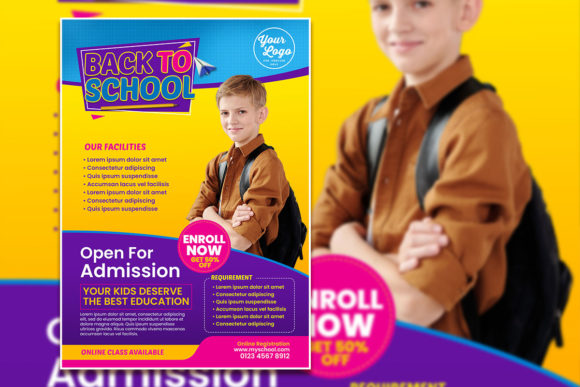
Modern Back to School Poster Template: A Practical Guide for Creators and Marketers
If you’ve ever spent hours trying to design a back‑to‑school poster from scratch, you know how quickly the excitement fades. You open a blank document, stare at it, and realize you have no idea where to start with the layout, the color palette, or even the font pairing. That’s where a Modern Back to School Poster Template steps in. It gives you a head start, but more importantly, it gives you structure without locking you into a rigid design.
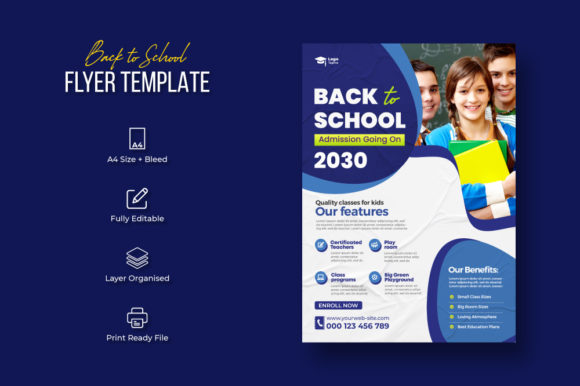
This particular template is built for people who need to move fast but still want a polished, professional result. It comes as a single PSD file that’s 100% layered and fully editable. The file is set to 300 DPI with an RGB color profile, sized at A4 with a 0.25‑inch bleed – meaning it’s ready for both digital display and printing. And since it includes 100 free fonts (which you’ll need to download separately), you have plenty of typography options without spending extra money. The only thing not included are the images, but that’s actually a good thing: you can replace the placeholder photos with your own, and it really couldn’t get any easier.
In this article, we’ll look at where, when, and why you might use this template, walk through realistic scenarios, and talk about the things you should consider before you download and start customizing.
Why a Ready‑Made Poster Template Saves More Than Time
Back‑to‑school season is hectic for everyone – parents, teachers, school administrators, and business owners running seasonal promotions. A poster template that’s already designed with the right dimensions, bleed area, and print settings removes the guesswork. Instead of worrying about margins or color profiles, you can focus on the message and the visuals that matter to your audience.
Think about a teacher preparing classroom posters for open house night. They need something that looks engaging but also communicates rules, schedules, or inspirational quotes. A template with modern aesthetics – clean lines, balanced typography, and customizable layers – lets them switch out the text and images in minutes. The same applies to a small bookstore owner advertising a back‑to‑school sale. They want to avoid a generic, overused design. With a layered PSD, they can tweak colors to match their brand, change the background, and even resize elements without starting over.
The fact that this template is 100 layered and full editable means you’re not stuck with the default look. If you dislike the placeholder image, you delete it and drop in your own photo. If you want to move the headline to the left, you simply drag the layer. That level of control is what separates a template from a rigid design that’s barely customizable.
Real‑World Use Cases Across Different Settings
Let’s move beyond generic “you can use it for posters” and into specific situations where this template shines.
For Teachers and Educators
Imagine you’re a middle school science teacher preparing a poster for your classroom door. You want to greet students with something that reflects the upcoming semester – maybe a periodic table pun or a space‑themed welcome. Using the Modern Back to School Poster Template, you open the PSD, change the headline to your own text, and replace the stock photo with a picture of a galaxy or a lab setup. The 0.25‑inch bleed ensures that when you print it on standard A4 paper, nothing important gets cut off. You can also experiment with the free fonts to find one that matches your humorous or serious tone.
A similar scenario works for school counselors creating posters for mental health awareness or study tips. Since the template comes in RGB, colors will be vibrant on screen, but you can also convert to CMYK later for professional printing if needed. The key is that you don’t need to understand print margins or resolution – it’s all preset.
For Small Business Owners and Marketers
Retailers, tutoring centers, and even local coffee shops use back‑to‑school themes to draw in customers. A tutoring center might want to promote a “back‑to‑school assessment” campaign. Using the template, the owner can add a photo of a friendly tutor working with a student, write a compelling call‑to‑action, and adjust the color scheme to their brand blue. The 300 DPI resolution means the printed poster will look crisp on an A4 flyer or a larger poster when scaled properly (though keep in mind the A4 size – for larger formats you may need to resize).
Because the PSD is fully editable, you can also repurpose the same file for social media. Duplicate the file, change the dimensions of the canvas (but be mindful of the print‑ready settings), and export as a JPEG for Instagram or Facebook. That flexibility means you’re not buying separate templates for print and digital – one file can serve both with minor adjustments.
For Freelance Graphic Designers and Marketers
If you’re a freelancer who designs posters for multiple clients, this template gives you a starting point that you can quickly adapt for different industries. For one client, you replace the image with a photo of school supplies; for another, maybe a computer setup for an online learning program. You can save the template as a master file and duplicate it for each project. The 100 free fonts are a huge bonus because you don’t have to purchase licenses for each project – just make sure the fonts are allowed for commercial use (most free fonts are, but double‑check).
Freelancers also appreciate the 0.25‑inch bleed and 300 DPI because it means you can deliver a file that the print shop won’t reject. Clients often don’t understand why their poster looks blurry or has white edges – with this template, that risk is minimized.
For Parents and Hobbyists
Yes, parents can use this too. Maybe you want to create a sign for your child’s first day of school – a funny photo with a chalkboard background. The template’s layered design lets you mask the photo behind text or add decorative elements. Even if you’re not proficient in Photoshop, the well‑organized layers (usually named groups) make it straightforward. You can also export the final design as a digital file to share on social media or print at home.
What to Consider Before You Download and Use the Template
While this template is designed to make life easier, a few things deserve your attention.
- Images are not included. This is clearly stated, but it’s worth repeating. The preview photos are for demonstration only. You’ll need to supply your own photos. That’s actually a strength – you avoid copyright issues and can tailor the visuals exactly to your project. Just make sure your images are high resolution (ideally 300 DPI) so they match the print quality of the template.
- You need access to Adobe Photoshop or a compatible program that can handle PSD files with layers. If you’re using a free tool like GIMP, it can open PSDs but sometimes has issues with layer styles or smart objects. Test the file early.
- The 100 free fonts are not preloaded. You’ll need to download them separately. The template probably came with a link or a list. Organize the fonts before you start editing – install them system‑wide or through your font manager. Missing fonts can cause your text to fallback to default (and break the design).
- Color profile: RGB. That’s perfect for digital screens, but if you plan to send the poster to a commercial printer, ask whether they require CMYK. You can convert the file later, but be aware that colors might shift. For most home or school printers, RGB works fine.
- Paper size: A4. This is a standard size for flyers, handouts, and small posters. If you need a larger format (like A3 or tabloid), you’ll need to scale up, which may affect image resolution. The template is best used for A4 prints.
- Bleed area: 0.25 inches. So design your important content inside the safe zone. If you place text too close to the edge, the bleed might cut it off. Most templates include guides or marks – pay attention to them.
How to Make the Most of the Template’s Features
To get the best results, start by familiarizing yourself with the layer structure. In a well‑designed PSD template, you’ll usually find folders named “Background”, “Elements”, “Text”, “Images”, and so on. Take a few minutes to rename layers if needed, especially if you plan to reuse the file for different projects.
When you replace the placeholder image, use a photo that has similar lighting and composition to the original – it will blend better with the design. You can also adjust the color overlay or blending modes to match the template’s color scheme.
Experiment with different fonts from the 100 free fonts provided. Stick to two or three font families at most to keep the layout coherent. The template likely uses modern sans‑serif designs, but you can swap them for something more playful if your audience is younger.
Before printing, export a PDF with the “Print” preset and check the preview. If printing at home, use high‑quality paper and adjust printer settings for the 300 DPI resolution.
Finally, remember that the template is a foundation – your personal photos, text, and brand colors will make it unique. Even if you’re not a designer, the layered structure gives you the confidence to make changes without breaking the design.
Final Thoughts
The Modern Back to School Poster Template is not a magic solution that designs itself, but it is a practical shortcut for anyone who needs professional‑looking posters without the hours of setup. Whether you’re a teacher preparing for a new term, a business owner launching a promotion, or a parent capturing a milestone, the template’s high‑resolution format, full editability, and thoughtful bleed settings give you a reliable starting point.
One of its strongest features is that it respects your need for flexibility – you can change nearly every element, from background gradients to font sizes. Just come with your own photos and a clear idea of your message, and the template does the heavy lifting on structure and resolution. The result is a poster that looks custom‑made, even though you started from a pre‑built file.
So before the next back‑to‑school rush hits, take a few minutes to download the template, install those free fonts, and test a design with your own image. You’ll see how quickly you can go from blank screen to finished poster – and that’s the kind of head start that makes the season a little less stressful and a lot more creative.