40 Back to School Icons – Flat for Practical Design Projects
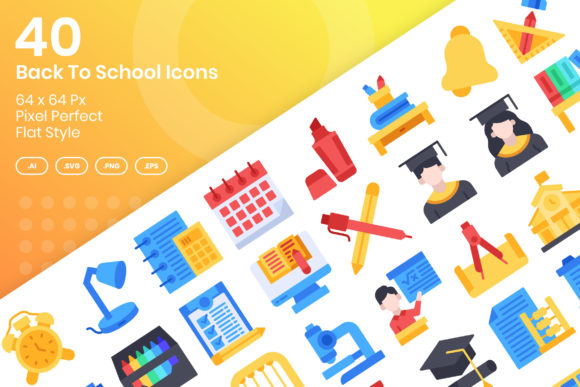
When preparing materials for the back-to-school season, the right visuals can make a significant difference. Whether you are designing a classroom handout, a website banner, a mobile app interface, or a promotional flyer, icons help communicate ideas quickly and clearly. The 40 Back to School Icons – Flat set offers a curated collection of vector icons built on a 64 x 64 px grid, designed to be pixel perfect and easy to edit. Understanding what this set includes and how it fits into real projects can help you decide if it is the right choice for your work.
What the 40 Back to School Icons – Flat Set Delivers
This icon set provides forty distinct symbols that cover common back-to-school themes. From books and pencils to buses and classrooms, the collection aims to cover the range of visuals that educators, marketers, and content creators often need. Each icon follows a flat style, which means clean lines, solid colors, and minimal shading. This design approach works well across many formats because it avoids complex gradients that can look inconsistent when resized or printed.
The set is delivered in several file formats: AI, EPS 10, PNG (at 64 px, 128 px, 256 px, and 512 px), and SVG. Having both vector and raster options means you can use the icons in nearly any software environment. The AI and EPS files give you full control over editing, while the PNG files are ready to drop into presentations, documents, or web layouts without additional work. The SVG format is especially useful for responsive web design because it scales without losing sharpness.
Why a 64 x 64 px Grid Matters for Consistency
One of the standout features of this set is that it is based on a 64 x 64 px grid with pixel-perfect alignment. For designers, this means each icon sits within a uniform bounding box, and the shapes snap to the pixel grid. When you place multiple icons side by side, they align naturally, which saves time during layout work. Pixel-perfect icons also reduce fuzziness or blurriness on screens, especially at smaller sizes. If you have ever struggled with icons that look slightly off-center or uneven when placed together, this grid-based approach addresses that issue directly.
For non-designers—such as bloggers or small business owners—this grid system provides peace of mind. You do not need to spend extra time aligning or adjusting icons manually. They arrive with a consistent footprint, so you can use them as-is and still achieve a polished result.
Practical Benefits for Everyday Work
The value of a well-made icon set goes beyond aesthetics. Here are several ways the 40 Back to School Icons – Flat collection can support your projects.
Saves Time During Content Creation
Creating original icons from scratch takes hours. Even if you are comfortable with vector software, designing a full set of school-themed symbols can delay your project. This set removes that bottleneck. You get forty ready-to-use icons that you can drop into your work immediately. For a teacher preparing weekly newsletters or a marketer building a campaign landing page, that time saving is meaningful.
- Use the PNG files directly in PowerPoint or Google Slides.
- Import the SVG files into web design tools like Figma or Sketch.
- Open the AI or EPS files in Adobe Illustrator to make custom adjustments.
Having multiple formats means you rarely need to convert files or worry about compatibility.
Supports Consistent Branding Across Channels
If you are a small business owner or freelancer managing your own branding, maintaining visual consistency can be challenging. Using the same icon set across your website, social media graphics, printed materials, and email newsletters creates a cohesive look. Because these icons share a uniform style and grid, they reinforce your brand identity rather than introducing visual noise.
For example, a tutoring center might use the icons on its website navigation, in its enrollment flyers, and on its classroom signage. Parents and students see the same visual language in every interaction, which builds recognition and trust.
Easy to Customize Without Design Skills
One limitation of many icon sets is that they are locked down or difficult to modify. This set is built with customization in mind. Because the icons are vector based, you can change colors, resize them without quality loss, or combine them with other elements. Even if you are not a professional designer, opening an AI or EPS file and adjusting the fill color to match your brand palette is straightforward.
If you need a specific icon to have a different tone for a particular project—like changing a red apple to green for a nutrition-themed lesson—you can do that in seconds. This flexibility is particularly useful for educators who want their materials to feel fresh and tailored to their curriculum.
Realistic Use Cases Across Different Roles
Different professionals will find different value in this set. Here is how it might serve specific audiences.
Educators and School Staff
Teachers, instructional designers, and school administrators often need to create handouts, bulletin boards, newsletters, and digital learning materials. The straight-to-the-point style of flat icons works well in these contexts because it does not distract from the content. A teacher building a quiz worksheet could use the icons to label sections visually. A school office manager preparing a back-to-school packet can insert icons next to key reminders, making the information easier to scan.
Because the icons are available at multiple PNG sizes, you can use the 64 px versions for inline web content and the larger 256 px or 512 px versions for printed posters. This eliminates the need to manually resize and risk losing quality.
Marketers and Bloggers
If you run a blog or manage social media accounts focused on education, parenting, or school life, icons add visual interest to your posts. A single icon can reinforce a headline or break up a wall of text. For email marketing campaigns, icons placed next to bullet points or calls to action can improve click-through rates by guiding the reader’s eye.
The vector formats also allow you to create your own infographics or comparison graphics. For instance, you could build a "school supply checklist" graphic using the icons from the set, then share it across Pinterest, Instagram, and your blog. The consistent style ensures the graphic looks professional even if you assemble it quickly.
Freelancers and Small Business Owners
Freelancers who take on projects for schools, educational startups, or children-oriented brands can use this set to speed up client work. Having a reliable icon library reduces the need to outsource illustration work or purchase individual icons at higher cost. Small business owners who sell printable products—such as planners, flashcards, or classroom decorations—can incorporate these icons directly into their product designs. The commercial suitability of icon sets varies, so it is always wise to review the license terms, but sets designed for broad project use often cover these scenarios.
What to Keep in Mind When Using This Set
No single icon set suits every situation. Here are a few considerations that can help you decide if this collection fits your needs.
Flat Style Limits Certain Visual Effects
By design, flat icons avoid shadows, gradients, and texture. If your project calls for a highly detailed, photorealistic, or skeuomorphic look, this set will not match that aesthetic. However, flat design remains popular in modern interfaces, presentations, and print materials because it reads clearly at small sizes and reproduces well on both screens and paper. If your project already uses a flat or minimal style, these icons will blend in naturally.
Set Size and Scope
Forty icons cover a broad range of school-related concepts, but you may eventually need a symbol that is not included. For example, specific subjects like chemistry lab equipment or musical instruments might not be present. In those cases, you could supplement the set with another icon pack or create your own using the same visual style. Knowing the limits of this set upfront helps you plan projects without frustration.
File Format Usage
Most users will find the PNG and SVG files sufficient for everyday work. The AI and EPS files are useful if you plan to edit the icons extensively or need to output them at non-standard sizes. If you do not have access to vector editing software, you may not use those formats. But having them included means you have the option to customize later if your workflow changes.
How to Get the Most Out of 40 Back to School Icons – Flat
To make the icons work best for your projects, consider organizing them before you start designing. Create a folder with subdirectories for each format (AI, EPS, PNG, SVG) so you can find the right file quickly. If you work with a consistent color palette, open the vector file once and customize the colors, then save a branded version for ongoing use.
When using the icons in a website or app, SVG is typically the best choice because it supports responsive scaling and can be styled with CSS. For printed materials, the larger PNG files (256 px or 512 px) give you plenty of resolution. The 64 px PNG files are ideal for icon fonts or small interface elements where you want a fixed size.
If you are building a presentation in Keynote, PowerPoint, or Google Slides, you can drag and drop the PNG files directly into your slides. Because the icons are pixel perfect, they align well with text and other design elements without effort.
Who Benefits Most
The 40 Back to School Icons – Flat set is most valuable for people who need ready-to-use visuals but do not have time to create their own. This includes educators preparing classroom materials, content creators producing school-related articles or videos, small business owners developing back-to-school products, and professionals who maintain educational websites or apps. The combination of multiple file formats, grid-based consistency, and ease of editing makes it a practical choice for anyone who values efficiency and clean design.
If you are a marketer or entrepreneur who produces seasonal campaigns, having a reliable icon set can simplify your workflow and ensure your materials look cohesive. The flat style is also well suited for mobile apps and responsive websites, where clarity at small sizes is essential.
Even if you are a hobbyist—designing a custom planner for your child's school year or creating a printable chore chart—this set gives you professional-quality elements without requiring design training. You can focus on the message and layout, knowing the icons will hold up visually.
While no icon set is perfect for every project, understanding what this one offers helps you use it effectively. The 64 x 64 px grid, pixel-perfect alignment, and vector flexibility address common pain points in design work. By matching the set's strengths to your specific needs, you can produce polished materials in less time and with less effort.